Move files locally from iPhone to any browser.
FileTransfer creates a private Wi-Fi transfer room on your iPhone. Send text, photos, videos, audio, and large files without accounts, cables, or cloud storage.
Built for quick local transfers
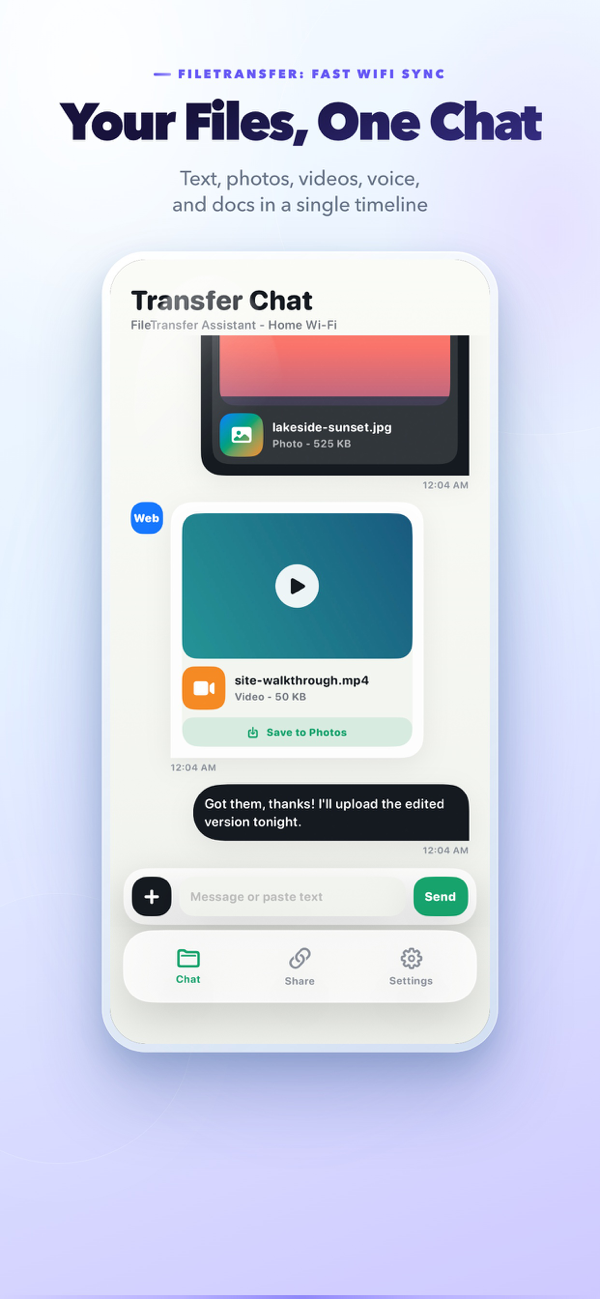
Everything is centered around a simple timeline, so both your iPhone and the browser see the same transfer history.
Start sharing and open the local address from a Mac, PC, tablet, or another phone on the same Wi-Fi.
Upload big files from a browser without the app slowing down or running out of memory.
Photos, videos, and audio can be previewed inline before downloading or saving.
Your transfer history and files stay stored right on your iPhone.
Record audio from the iPhone and share it into the same transfer timeline.
Review storage usage by photos, videos, audio, and files, then clear history when needed.
See it on iPhone
The transfer chat, quick attachments, and the sharing screen — straight from the App Store.


Three steps, no setup account
FileTransfer works like a temporary local handoff desk for devices already near you.
Start sharing
Open the Share tab and turn on the local HTTP server while connected to Wi-Fi.
Open the address
Type the displayed address into a browser on the same network.
Send both ways
Drop files into the browser or send from the iPhone; everything appears in the chat.
Questions before you install
Need help? Reach us at support@iamdev.me.
Does FileTransfer upload my files to a server?
No. Transfers happen over your local Wi-Fi between your iPhone and nearby browsers. There is no cloud account or remote backend.
Can a browser upload files to the iPhone?
Yes. Enable browser uploads in Settings — even large files upload smoothly.
Can I install from Safari?
On iPhone and iPad, Safari shows an App Store smart banner for this page. The download buttons also open the App Store listing directly.
What happens when files are deleted?
History cleanup removes matching sandbox files, and browser downloads check for missing files before starting.
Install FileTransfer for local Wi-Fi handoffs
A focused transfer tool for moving files around the devices already on your desk.